TopOnMEDIATION
TopOn Mediation
Section titled “TopOn Mediation”This document describes how to add the custom-network Adapter supplied by HeheSDK to the TopOn (ThinkUp) mediation platform, so waterfall requests can reach HeheSDK inventory.
TopOn docs:
Custom advertising platform (SDK ≥ 6.4.94)
Supported Ad Formats
Section titled “Supported Ad Formats”| Ad Format | Supported |
|---|---|
| Banner | Yes |
| Interstitial | Yes |
| Native | Yes |
| Reward | Yes |
Setup Steps
Section titled “Setup Steps”1. Create a Custom Network Firm
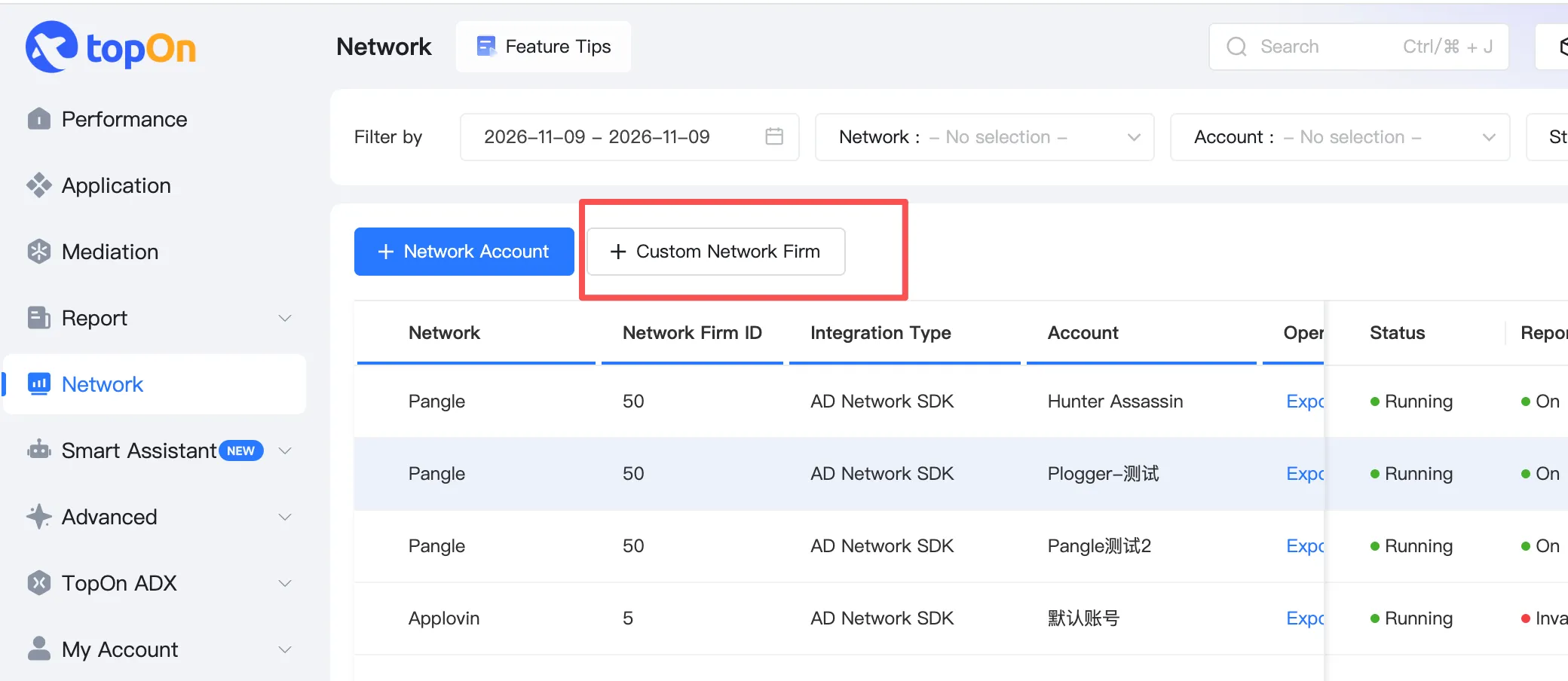
Section titled “1. Create a Custom Network Firm”In the TopOn dashboard, open Network, then click + Custom Network Firm.
Enter the firm details (for example, set Network Firm Name to HeheSDK), fill in Adapter class names per platform, and submit.
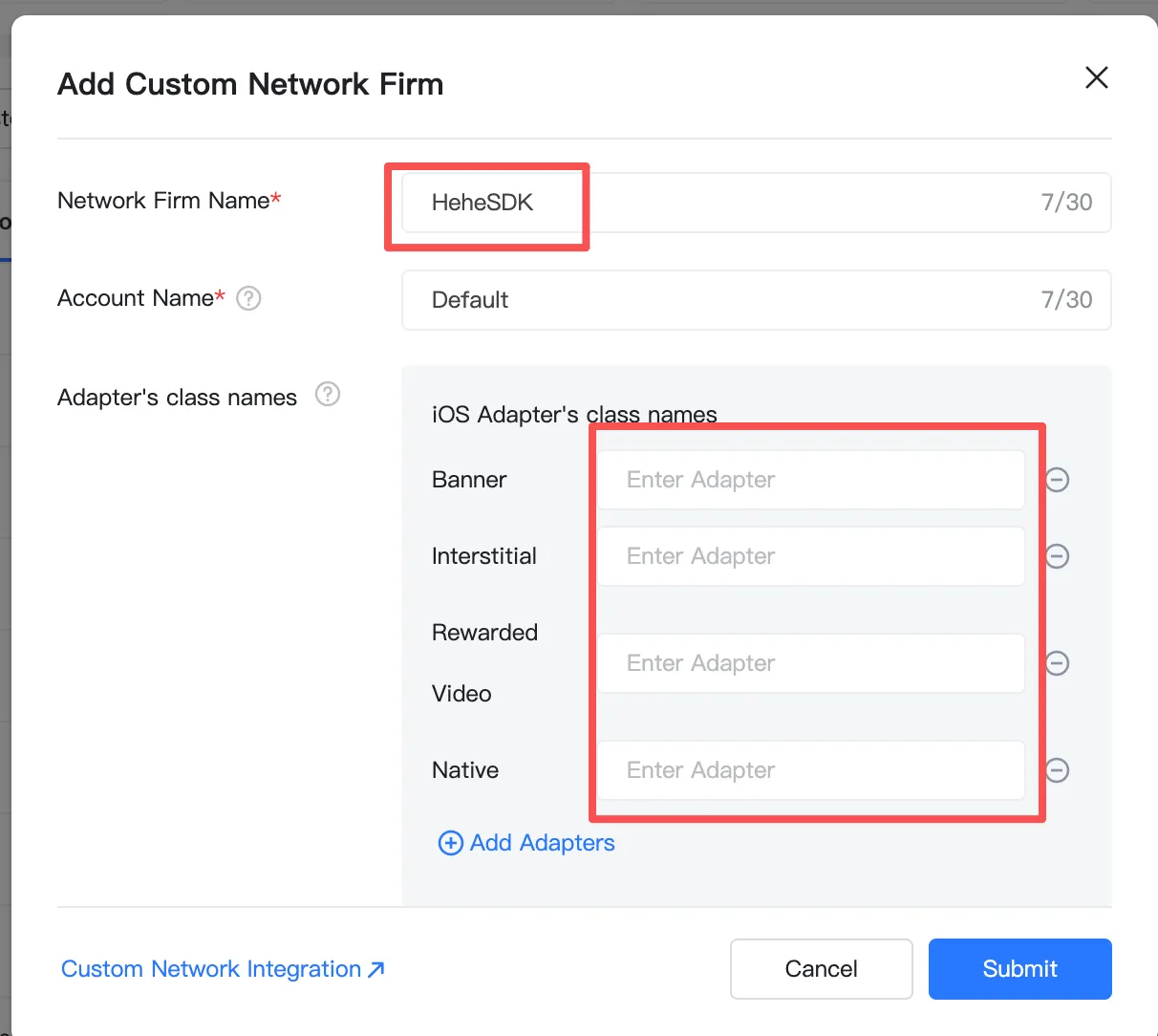
Android
Section titled “Android”| TopOn format | Adapter class name |
|---|---|
| Banner | com.hehessp.sdk.topon.banner.HeheTopOnBannerAdapter |
| Interstitial | com.hehessp.sdk.topon.interstitial.HeheTopOnInterstitialAdapter |
| Rewarded | com.hehessp.sdk.topon.rewarded.HeheTopOnRewardedAdapter |
| Native | com.hehessp.sdk.topon.nativead.HeheTopOnNativeAdapter |
| Role | Class name |
|---|---|
| Banner | HeheTopOnBannerAdapter |
| Interstitial | HeheTopOnInterstitialAdapter |
| Rewarded | HeheTopOnRewardedAdapter |
| Native | HeheTopOnNativeAdapter |
Use a dedicated Hehe placement per format (Banner / Interstitial / Rewarded / Native). Do not reuse placements across formats.
2. Configure Ad Source Parameters
Section titled “2. Configure Ad Source Parameters”In Mediation, select the app and placement, then click Add AD Source.
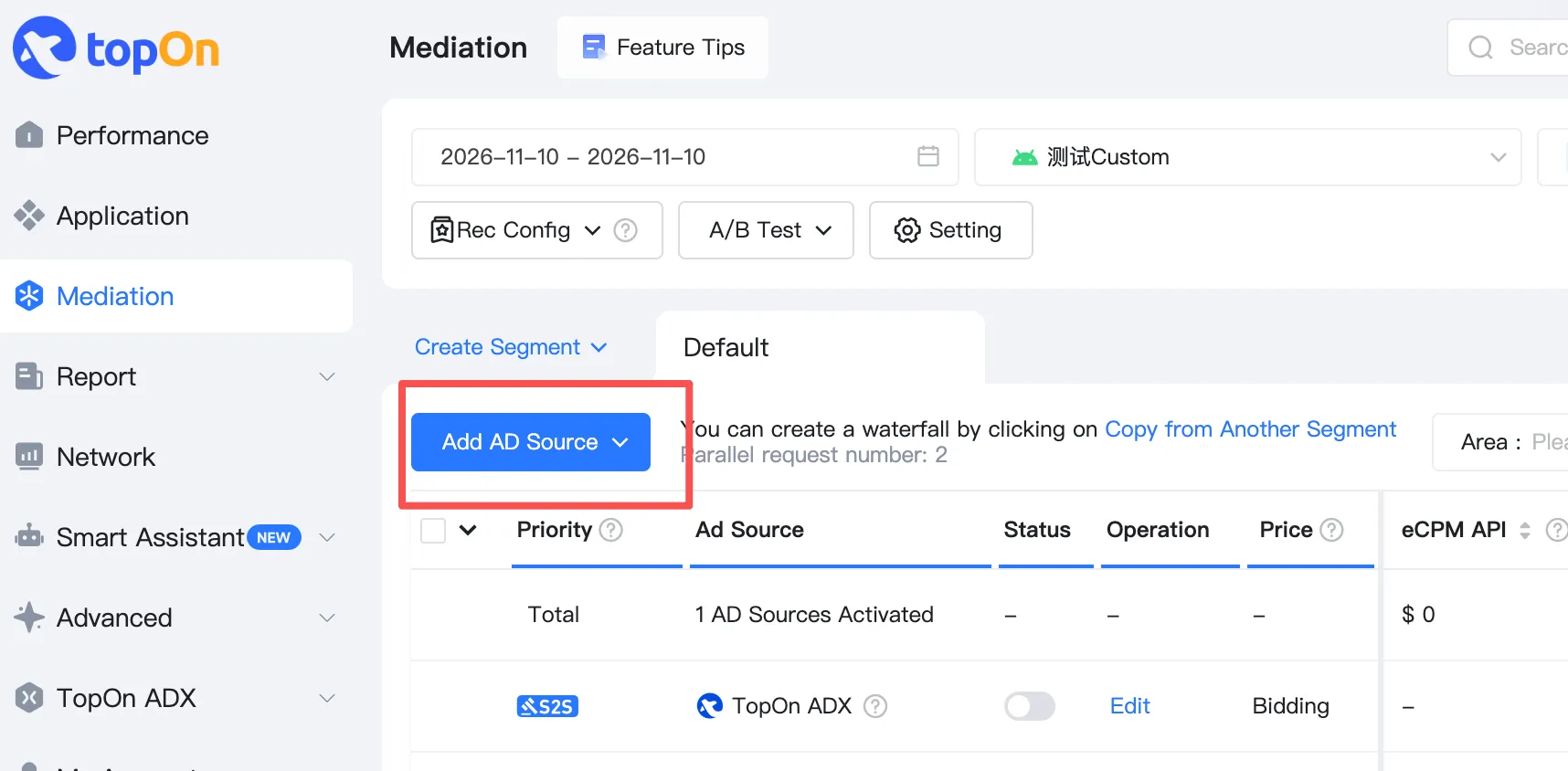
In the Add Ad Source dialog:
- Network Firm: select the
HeheSDKfirm created above - Slot ID: enter the HeheBid / HeheSSP Placement ID
TopOn’s default custom-source unit-id key isslot_id - Fill the remaining fields as needed and submit
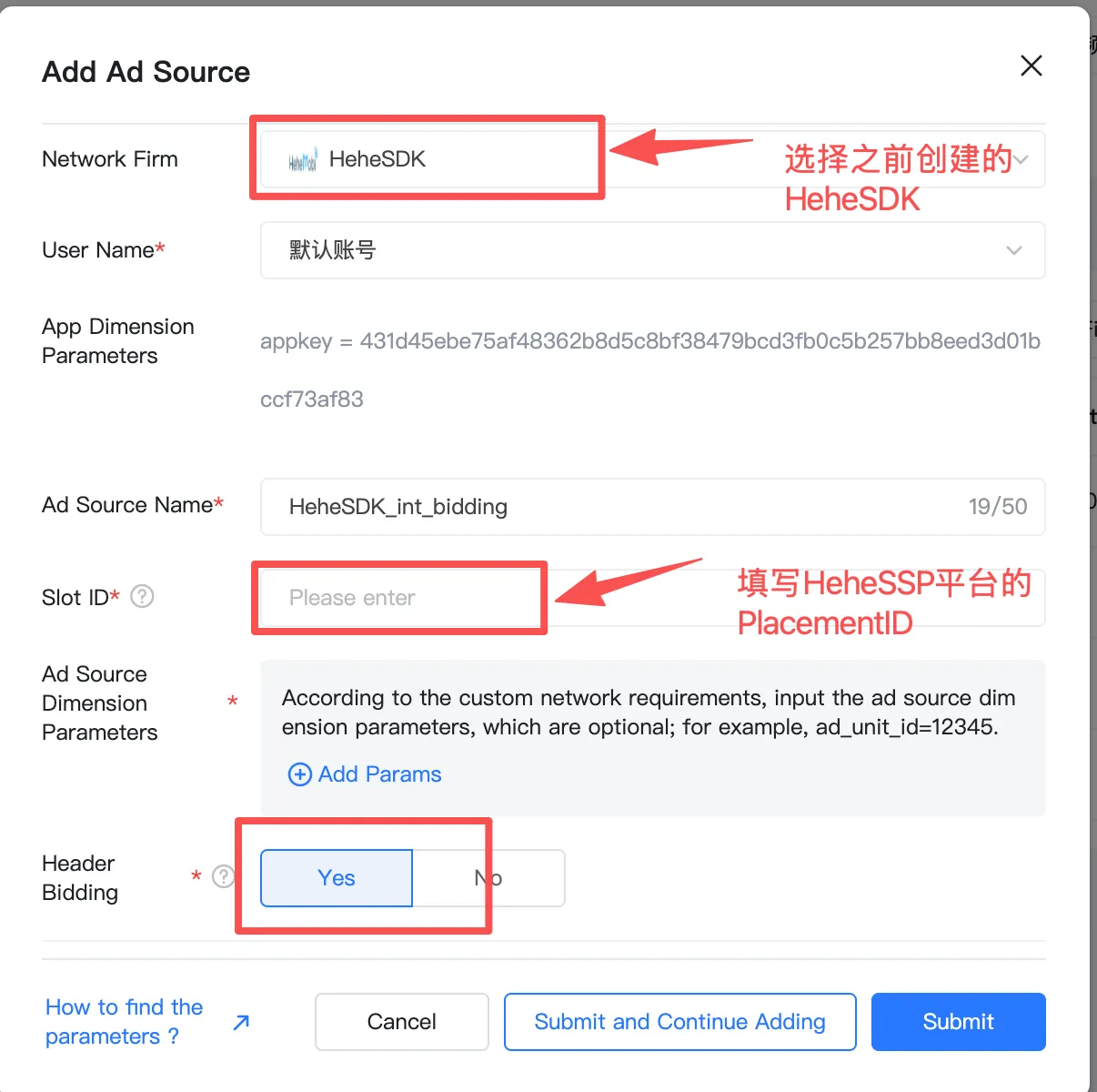
Android Integration Guide
Section titled “Android Integration Guide”Dependencies come from public repo hehesdk/android-release via JitPack (replace the version with a published tag; latest public: 0.2.6).
The Adapter is thin: it does not bundle Hehe SDK or TopOn / ThinkUp SDK. The host must initialize the TopOn SDK itself.
dependencyResolutionManagement {    repositories {        google()        mavenCentral()        maven("https://jitpack.io")        // TopOn / ThinkUp SDK        maven("https://jfrog.anythinktech.com/artifactory/overseas_sdk")    }}
dependencies {    // Core SDK (required)    implementation("com.github.hehesdk.android-release:hehesdk:0.2.6")
    // TopOn adapter    implementation("com.github.hehesdk.android-release:adapter-topon:0.2.6")
    // ThinkUp / TopOn (verified version; do not also add banner-tpn / interstitial-tpn format SDKs)    implementation("com.thinkup.sdk:core-tpn:6.5.73")
    // Host must declare explicitly (not transitive from the AAR)    implementation("androidx.media3:media3-exoplayer:1.10.1")}
core-tpn:6.5.73 already includes custom Adapter APIs for all formats. If the waterfall includes other networks, add their adapter-tpn-* artifacts per TopOn’s official checklist.
Setting HeheSDK App Key
Section titled “Setting HeheSDK App Key”When integrating via TopOn mediation, set the App Key in AndroidManifest.xml. The adapter auto-initializes Hehe — do not call AdSDK.init() again. The host still initializes TopOn SDK itself.
<meta-data android:name="com.hehessp.sdk.APP_KEY" android:value="YOUR_HEHE_APP_KEY" />iOS Integration Guide
Section titled “iOS Integration Guide”CocoaPods
Section titled “CocoaPods”platform :ios, '13.0'use_frameworks! :linkage => :static
source 'https://cdn.cocoapods.org/'source 'https://github.com/hehesdk/ios-sdk-specs.git'
target 'YourApp' do pod 'HeheTopOnAdapter', '0.2.10'endHeheTopOnAdapter depends on matching HeheSDK and TPNiOS/TPNSDK (≥ 6.4.94). Initialize TopOn SDK in the host app.
Info.plist
Section titled “Info.plist”Configure HeheSSPAppKey in Info.plist:
<key>HeheSSPAppKey</key><string>YOUR_HEHE_APP_KEY</string>The adapter reads this key and auto-initializes HeheSDK — do not call initSDK again unless the app needs an early init for other reasons.
Android
Section titled “Android”- Class names must be the fully qualified names above; do not mix legacy AnyThink /
com.secmtp.sdk.*packages. - Missing
com.hehessp.sdk.APP_KEYor failed auto-init returnsSDK_NOT_READY. - Missing / blank
slot_idreturnsINVALID_PLACEMENT; invalidbanner_sizereturnsINVALID_BANNER_SIZE.
If CocoaPods cannot find HeheTopOnAdapter, run pod repo update hehesdk-ios-sdk-specs and then pod install again.